Slack and WhatsApp are both messaging apps. Both are free to start, let you send messages, share files, and make calls. On paper, they look like they do the same job.
But they don't.
WhatsApp is a consumer messaging app used by billions of people to stay in touch with friends, family, and clients. Slack is a workplace communication platform built specifically for teams and business workflows. The fact that businesses use WhatsApp for work doesn't make it a business tool. It makes it a personal tool, doing a job it wasn't designed for.
That distinction matters more as your team grows. What works fine for two people doing quick check-ins starts to break down fast when you've got five people, three active client projects, and a decision from two weeks ago that nobody can find in the scroll.
So, which of these two tools is best for your business?
The short answer: for team communication, workflow integration, and anything that needs to be searchable and organized, Slack wins hands down. WhatsApp has its place, especially for client-facing communication where your clients are already using it. Most growing service businesses end up using both deliberately, rather than letting both happen by accident.
The longer answer depends on your team size, how you work, and where your clients live. Let Day by Day break it down.
Key Takeaways on WhatsApp vs Slack
- Slack is purpose-built for team communication. WhatsApp is a consumer messaging app that businesses have adapted for work.
- Slack's channel structure, threading, notification controls, and integrations make it significantly more powerful for growing teams.
- WhatsApp works well for quick, informal communication, especially with clients or contacts who are already on it.
- The free versions of both tools have real limitations. Slack's paid plans start at $7.25/user/month; WhatsApp Business is free, but the API (needed for serious business use) adds cost and complexity.
- The real problem with most businesses is that they never built a communication system around the tool they picked.
Slack vs WhatsApp: What's the Difference?
At the most fundamental level, these two tools were built for different purposes. WhatsApp started as a personal messaging app. Slack was designed from the ground up for workplace communication. That origin shapes everything, from how conversations are structured to how notifications work to what you can integrate with.
Here's how they compare across the features that matter most for business:
Slack and WhatsApp Pricing
Both tools have free options, but they work very differently at the paid level.
Slack pricing (as of 2026)
Slack's Free plan limits message history to 90 days and caps app integrations at 10 apps. The Pro plan, at $7.25/user/month billed annually ($8.75/month billed monthly), includes unlimited message history and basic AI features. Business+ costs $15/user/month billed annually, and adds advanced AI, SSO, compliance exports, and SCIM provisioning. Enterprise+ is custom-priced and includes HIPAA compliance.
One thing worth knowing: Slack requires a minimum of 3 users on paid plans, so even a team of 2 pays for 3. There's also a fair billing policy that credits you for inactive users, which helps at scale.

WhatsApp pricing
WhatsApp Business (the app) is free. If you want to use it for serious business automation, customer communication flows, or integration with your CRM, you'll need the WhatsApp Business API. That's where the cost and complexity start.
The API isn't plug-and-play. Meta delivers it through third-party messaging partners, which means you're paying hosting fees (typically starting from $50/month), plus solution provider fees to integrate it with your existing tools. You're also billed per conversation, with pricing varying by country and conversation type (marketing, utility, authentication, or service). The first 1,000 conversations per month are free; after that, you're paying a few cents per thread.
For most service businesses, this level of setup only makes sense if WhatsApp is your primary client communication channel. If you're just using it for quick team chats, the free Business app is probably enough, but you'll hit its limits as your team grows.
Compare the Interface
Both Slack and WhatsApp are built for communication, but their interfaces differ significantly.
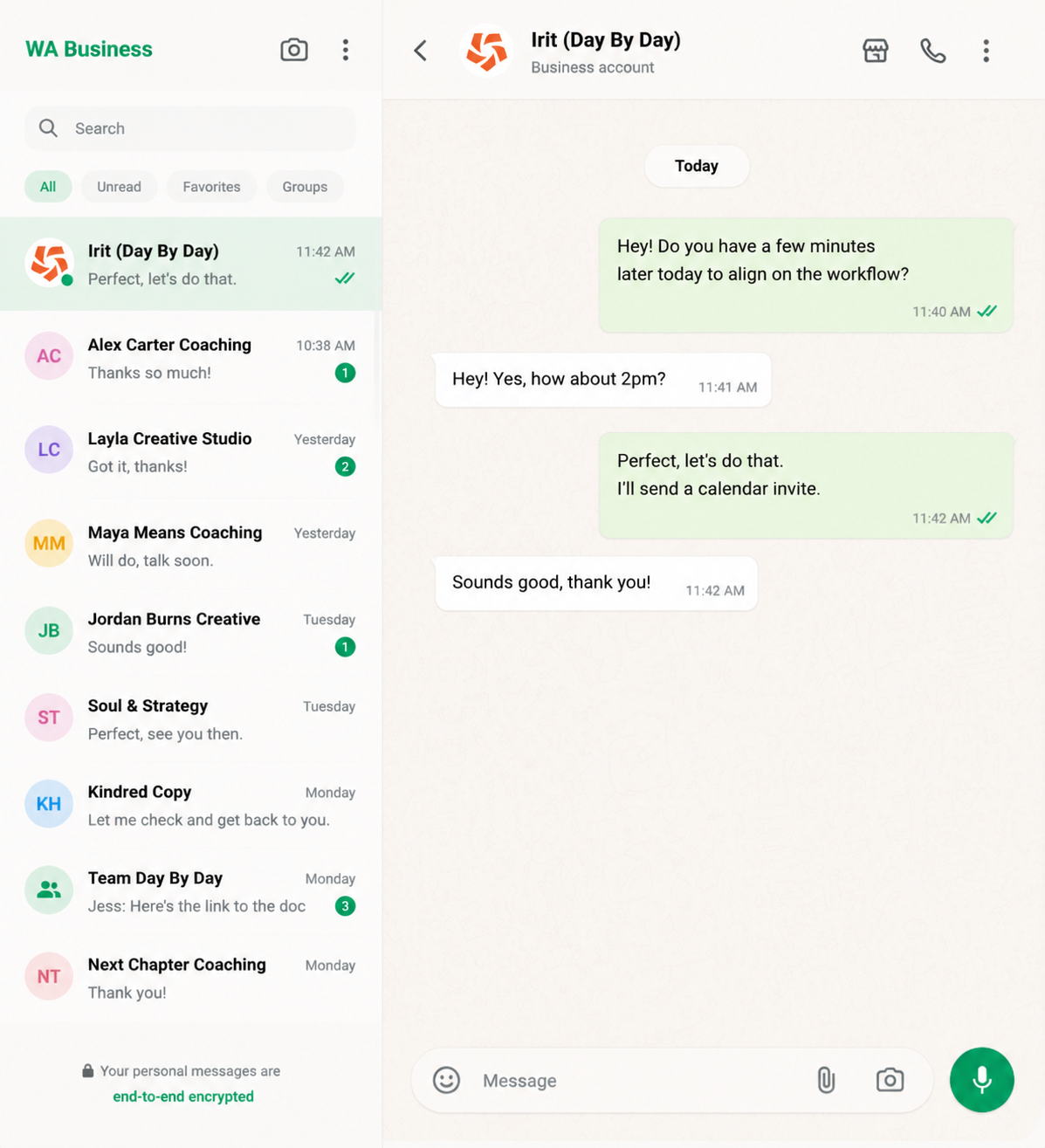
WhatApp is genuinely easy to use. Setup takes minutes (you need a phone number, not a work email), the interface is minimal, and anyone who's used it personally can pick up the business version immediately. That low barrier to entry is a real advantage, especially with clients or contacts who'd rather not install yet another app.
The desktop version has improved considerably, though signing in still requires a QR code scan from your phone. Group creation is straightforward, and the WhatsApp Business app allows multiple users to access the same profile. Its 2022 introduction of Communities (which groups multiple group chats under one umbrella, similar to Slack channels) added useful structure. But it's still catching up.
Slack
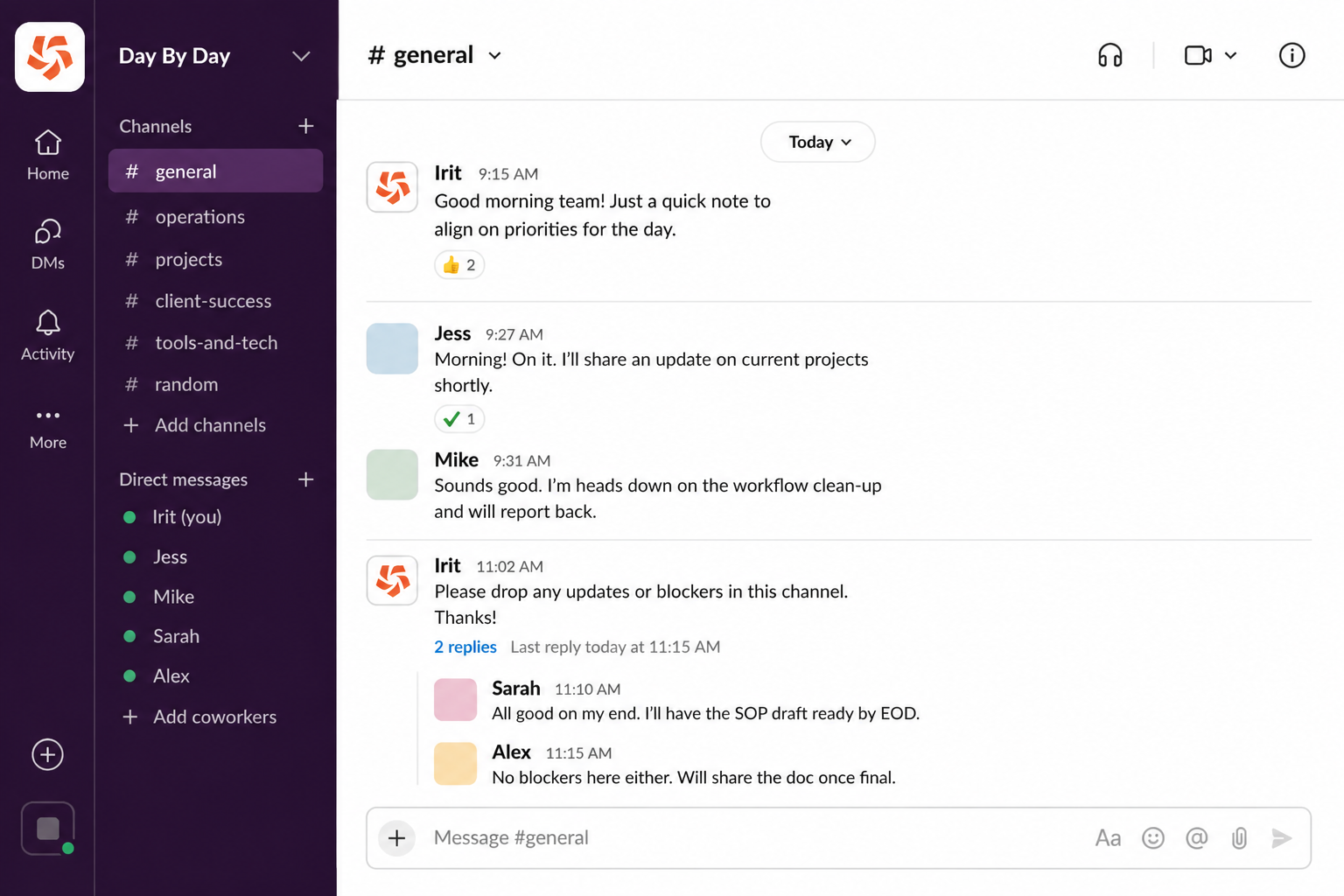
Slack takes a little longer to set up. You need a work email, you'll want to plan your channel structure, and new team members will go through an onboarding process. That friction is worth it. Once set up, Slack is significantly cleaner to navigate, especially as your team or project load grows. Public and private channels, threaded conversations, direct messages, and app notifications all live in one organized workspace. You can define exactly which channels you want to follow, mute the ones you don't, and keep all topics separate and only accessible to those who need them.
The channel-and-thread model is the part that makes the biggest difference in practice. In WhatsApp, a group conversation is one long scroll. In Slack, a conversation on one topic doesn't pollute another. If you've ever spent ten minutes scrolling through a WhatsApp group to find a decision that was made two weeks ago, you'll understand why this matters.
Slack vs WhatsApp for Business
The stark difference between these tools shows up once you start using them in a business setting.
Slack vs WhatsApp for Team Communication
WhatsApp groups work for small teams doing quick coordination. But when the team grows, or when multiple projects are running simultaneously, they start to break down as context matters and needs to be findable later.
Slack's channel and threading structure keeps discussions focused, and the threading feature allows direct replies within a channel, which is especially useful for preventing side conversations from cluttering the main discussion. WhatsApp offers group chats that work well for smaller teams or quick conversations, but lacks this structure.
Notifications are where this gap becomes most visible. In a busy WhatsApp group, your options are essentially: receive every notification, or mute the group and miss things. Slack lets you set notification hours and define keywords that always alert you, as well as offering the ability to mark channels as priority. You can go quiet for a few hours and come back to a prioritized summary of what needs your attention. That's not a small thing for anyone managing multiple clients or projects.
Is Slack More Secure than WhatsApp?
At a baseline level, the security of both Slack and WhatsApp is comparable. Both platforms use end-to-end encryption for messages.
The differences emerge in the context of business compliance and data control. Slack's Enterprise+ plan includes HIPAA compliance, which matters a great deal if you're working in healthcare or handling protected health information. No equivalent exists on WhatsApp.
WhatsApp's data practices also raise a consideration for businesses: Meta may share WhatsApp data with its parent company and affiliates. For teams sharing sensitive client information, project details, or financial data, that's worth factoring in.
For most small service businesses, neither platform creates a compliance problem in day-to-day use. But if your industry has regulatory requirements, or if you're building a workflow that involves sensitive data, Slack gives you a clearer compliance path.
WhatsApp Communities vs Slack
WhatsApp's Communities feature, introduced in 2022 and expanded since, lets you group multiple chats under one umbrella with an announcement channel. It's a meaningful improvement on the old group-only structure, and it does bring WhatsApp closer to Slack's channel model.
The practical difference is still significant. Communities are primarily phone-number-based groups. There's no equivalent to Slack's granular channel permissions, no threading within channels, no integration with your project management tools, and no way to filter by keyword across your entire workspace. WhatsApp Communities work well for community-style groups (e.g., client cohorts, local networks, etc.). They're less suited to operational team communication.
Slack channels, by contrast, were built for workflow. You can have a channel that only certain team members see, one that receives automatic notifications from your CRM, one that pipes in support tickets, and another that sends alerts when a form is completed. That kind of operational wiring isn't available in WhatsApp.
Slack and WhatsApp Integration
You can use Slack and WhatsApp together, and for many businesses, that combination makes sense. WhatsApp handles client-facing communication (because that's where your clients already are), while Slack handles internal team coordination, like project workflows, and tool integrations.
There are third-party tools that allow some level of WhatsApp-to-Slack integration, routing incoming WhatsApp messages into a Slack channel so your team sees them without logging into a separate app. This kind of setup requires a middleware tool like Zapier or Make and some configuration, but it's achievable without custom development.
Slack's native integration library is where it genuinely pulls ahead. Slack connects with 2,000+ tools, including project management platforms, CRMs, Google Workspace, calendar tools, and more. You can build workflows that send action items from a client call directly into a Slack channel, trigger notifications when a form is submitted, or pipe task updates from your project management tool into a team channel. WhatsApp simply doesn't have this capability without significant technical setup.
One integration worth calling out: Fathom, an AI-powered meeting assistant and note-taker that records, transcribes, and summarizes meetings, has a native Slack integration that lets you send call clips or action items directly into a channel in real time. It's the kind of seamless workflow connection that Slack makes possible and WhatsApp doesn't.
Slack AI and the New Slackbot
This is where the gap between Slack and WhatsApp widens considerably.
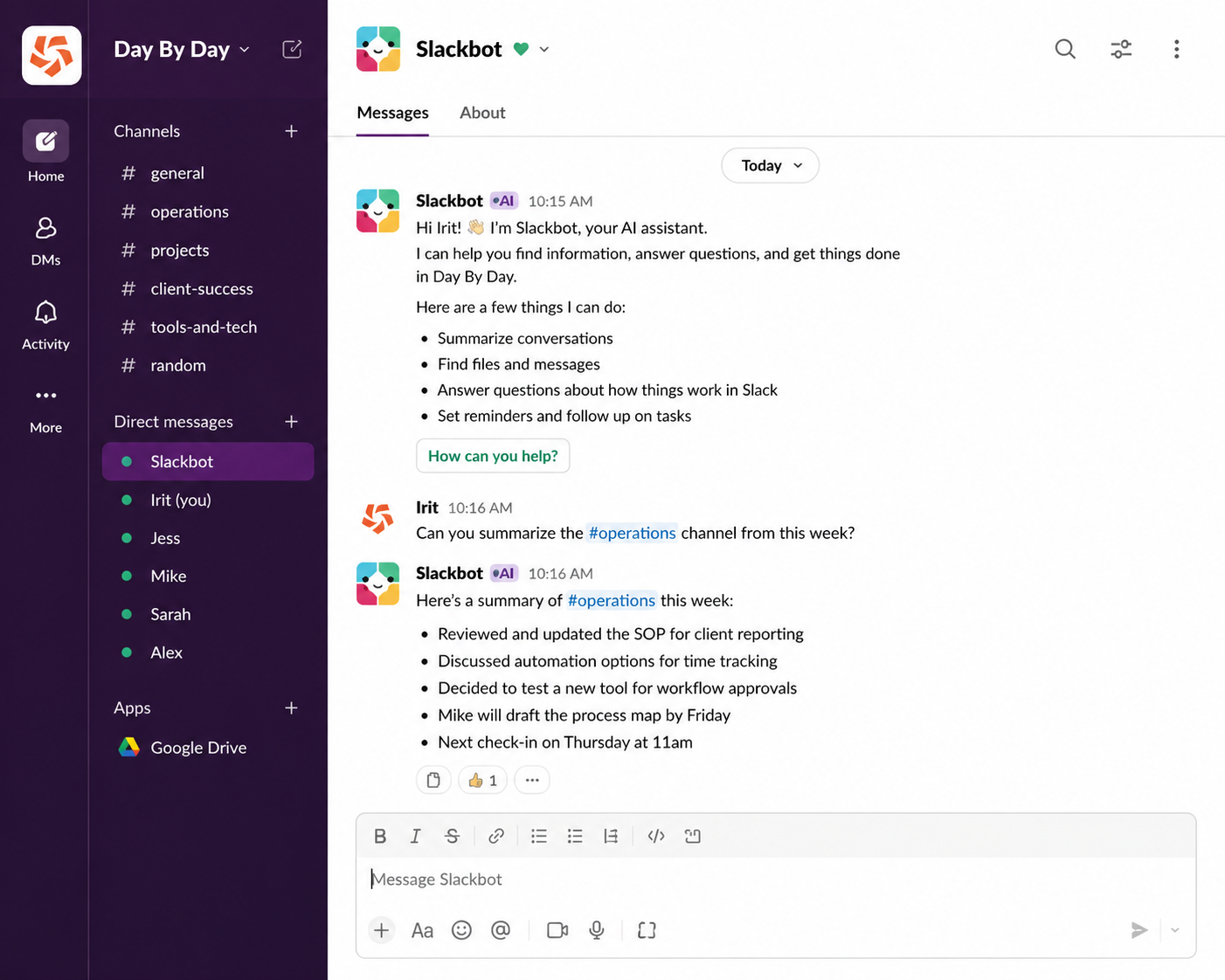
Slack now includes a built-in, highly capable AI assistant called Slackbot. Within one workspace, Slackbot:
- Summarizes conversations
- Pulls out decisions
- Generates updates
- Handles recurring tasks
- Connects to your other tools
For teams managing multiple projects or clients, this reduces the time spent searching for information or repeating admin work.
WhatsApp doesn’t offer anything comparable: there’s no built-in AI layer, so there are no meeting summaries or a native way to automate tasks on the platform.
If AI-supported workflows matter to your business (which they should), Slack is built for it. WhatsApp isn’t.
When Slack Makes More Sense For Your Business
Slack is the clearer choice when:
Your team is growing. Once you move beyond two or three people, conversation threads and channel separation stop being nice-to-haves. The cost of a missed message or a buried decision gets higher as more people are involved.
You need structured workflows. If your business runs on project management systems, a CRM, scheduling software, or any combination of the above, Slack's integration ecosystem means your tools can talk to each other through a single workspace. That's the difference between a communication tool and an actual operations layer.
Project collaboration is central to your work. Consultants, creative agencies, and service providers managing multiple concurrent sales pipelines and client projects need the ability to keep client A's conversations completely separate from client B's, with files, action items, and decisions searchable and findable. Slack handles this. WhatsApp does not.
When WhatsApp Could Work Better
WhatsApp is the right choice (or at least a necessary one) when:
Your clients are already there. In many regions and industries, WhatsApp is simply where business happens. If your clients message you on WhatsApp, adding Slack as a client communication channel creates friction for them, not you. Meeting people where they already are is a valid operational decision.
Your team is very small and coordination is informal. Two or three people doing quick check-ins don't necessarily need the infrastructure that Slack provides. A free WhatsApp Business account covers basic needs without any setup overhead.
You're communicating internationally. WhatsApp's global adoption rate is unmatched. WhatsApp Business has over 1.2 million customers in the Communication segment, particularly strong in Brazil, India, and across markets where WhatsApp dominates personal communication.
You need quick, low-friction voice or video calls. WhatsApp's call quality is excellent and requires no setup. For a quick client check-in, it's often the fastest option.
Slack or WhatsApp: The Real Problem Is Rarely the Tool
Choosing Slack over WhatsApp (or vice versa) won't fix a communication problem that's actually a systems problem.
If your team doesn't know what belongs in which channel, Slack will be as chaotic as a WhatsApp group. If nobody's decided what counts as urgent, notifications on any platform will either be overwhelming or ignored. If client communication is happening in three different places because nobody's made a decision about the right one, adding a fourth app doesn't help.
The tools matter, but the system around the tools matters more. That means deciding what communication belongs where, setting up the integrations that remove man**l effort, and making sure everyone on the team actually uses it the same way.
This is the work that most businesses skip when they switch tools. They move from WhatsApp to Slack and wonder why it's still messy. It's messy because the tool changed, but the system didn't.
If you want to explore what a better communication and workflow system could look like for your business, a Whizdom consultation is a good place to start. One hour to discuss your specific setup, with practical recommendations you can act on immediately.
Slack vs WhatsApp: Which Should You Choose?
If your team is small, communication is mostly external, and your clients are on WhatsApp: use WhatsApp Business and keep it simple.
If your team is growing, you're managing projects and workflows, you need your tools to talk to each other, or you want communication that doesn't require scrolling through 200 messages to find one decision: use Slack.
Most scaling service businesses end up using both. WhatsApp for client-facing communication, Slack for internal operations. The key is deciding that deliberately rather than letting it happen by accident.
Need Support Beyond Slack or WhatsApp?
At Day By Day, we help service businesses figure out which tools fit how they work, and then set them up properly so they get used. That means thinking through your communication stack in the context of your project management systems, your sales pipeline, and the people who'll be using it.
If you're ready to stop managing tools and start running a proper operation, let's talk.
FAQs: Slack vs WhatsApp
How is Slack Different From WhatsApp?
Slack is a workplace communication platform built for teams, with channels, threading, advanced notifications, and thousands of app integrations. WhatsApp is a consumer messaging app that businesses have adapted for client communication. They share basic messaging functionality but serve fundamentally different purposes.
Is Slack Better Than WhatsApp for Teams?
For teams managing projects, multiple clients, or growing operational complexity, yes, Slack is better than WhatsApp. Slack's channel structure, threaded conversations, notification controls, and integrations make it significantly more suited to team coordination than WhatsApp's group chat model.
Is Slack More Secure Than WhatsApp?
Both Slack and WhatsApp use end-to-end encryption. Slack's Enterprise+ plan offers HIPAA compliance for businesses in regulated industries, which WhatsApp doesn't provide. For businesses with compliance requirements, Slack offers a clearer path.
Can Slack and WhatsApp Be Used Together?
Yes, Slack and WhatsApp can be used together and many businesses do utilize both. WhatsApp handles client-facing communication where clients already are; Slack manages internal team coordination and workflow. Third-party automation tools can route WhatsApp messages into Slack channels if you want a unified view.
.png)