There is a moment most growing businesses hit where the founder realizes that almost everything important is stored in one place: their own head. How to onboard a client, how to send an invoice, how to handle the refund request that comes in at the worst possible time. It all works, until the founder takes a vacation or hires a new person.
A standard operating procedure is the fix: it takes a process out of your head and puts it somewhere your team can follow without you in the room. A good SOP is the difference between a business that depends on you for every decision and one that can run and improve without bottlenecks, which is exactly the kind of scalable process that Day by Day helps businesses build.
Key Takeaways About Writing an SOP
- A standard operating procedure (SOP) documents how a recurring task gets done, so anyone can do it consistently without relying on memory.
- SOPs make it easier to train staff, avoid mistakes, stay consistent, and grow your business.
- Different formats (step-by-step, hierarchical, flowchart, checklist) suit different kinds of work.
- The strongest SOPs are written by observing the work and then tested by someone unfamiliar with the process.
- SOPs are never finished; review them every six to twelve months or whenever the process changes.
What Is a Standard Operating Procedure?
A standard operating procedure is a documented set of step-by-step instructions that describes how to carry out a routine process the same way every time. The goal is consistency: whoever follows the SOP, whenever they follow it, should produce the same reliable result.
‘SOP’ is simply the abbreviation for ‘standard operating procedure’. You’ll see the term everywhere from hospitals and airlines to marketing agencies and solo consulting practices, because the underlying need is universal. Any time more than one person needs to do a task the same way, or one person needs to do it the same way repeatedly, an SOP is needed. Regulated industries like healthcare, manufacturing, finance, and food service rely heavily on SOPs because consistency is vital for safety and compliance. But service businesses and online creators benefit just as much, as their reputation and output capacity both depend on how work is structured.
Key Operational Terms Explained
It helps to be clear about three terms that often get used interchangeably, but each plays a different role in how work is defined and executed:
- A process is the overall arc of how something gets done in your business, from beginning to end. "Client onboarding" is a process. It spans several steps, sometimes several people, and answers the question "what happens, in what order?"
- A procedure is the detailed instruction for completing one part of that process. "How to set up a new client in our project management tool" is a procedure. It answers "how exactly do we do this specific thing?" An SOP documents a procedure.
- A work instruction is the most granular level: the precise clicks and inputs for a single task within a procedure. "Which fields to fill in on the new-client intake form" is a work instruction.
By way of analogy, the process is the map, the procedure is the route, and the work instruction is the turn-by-turn directions. The purpose of standard operating procedures is to capture procedures clearly enough that the people doing the work never have to guess.
Why Standard Operating Procedures Are Important
When processes live only in someone's head, the business becomes dependent on that person remembering everything correctly. Documentation changes the math. Here is why standard operating procedures are important enough to be worth the time it takes to write them.
- Consistency and quality control. An SOP guarantees that the tenth client gets the same experience as the first, regardless of who is handling the work or how busy the week is. Consistency turns a good service into a trusted brand.
- Faster onboarding and reduced training time. New hires ramp up faster when they can follow documented procedures instead of shadowing someone or interrupting them with questions. Organizations with structured documentation routinely report that new-hire time-to-productivity drops by more than half.
- Fewer errors and lower operational risk. Most mistakes are not skill problems; they are memory problems, like reversing an order or forgetting a detail under pressure. A written procedure captures the small, unseen tasks that fall through the cracks when there’s no system to track them.
- Scalability. You cannot scale what is not documented. Every time you want to delegate, hire, or automate, the first question is always "what exactly is the process?" When your passion scales faster than your systems, your business’s growth stalls at the limit of your personal capacity. SOPs let a business grow beyond its founder.
- Compliance and audit readiness. For regulated work, documented procedures are not optional. Even for businesses without formal regulators, well-kept SOPs make audits, certifications, insurance reviews, and due diligence far less painful, because the answer to "show us how you do this" already exists in writing.
SOP Formats and When to Use Which
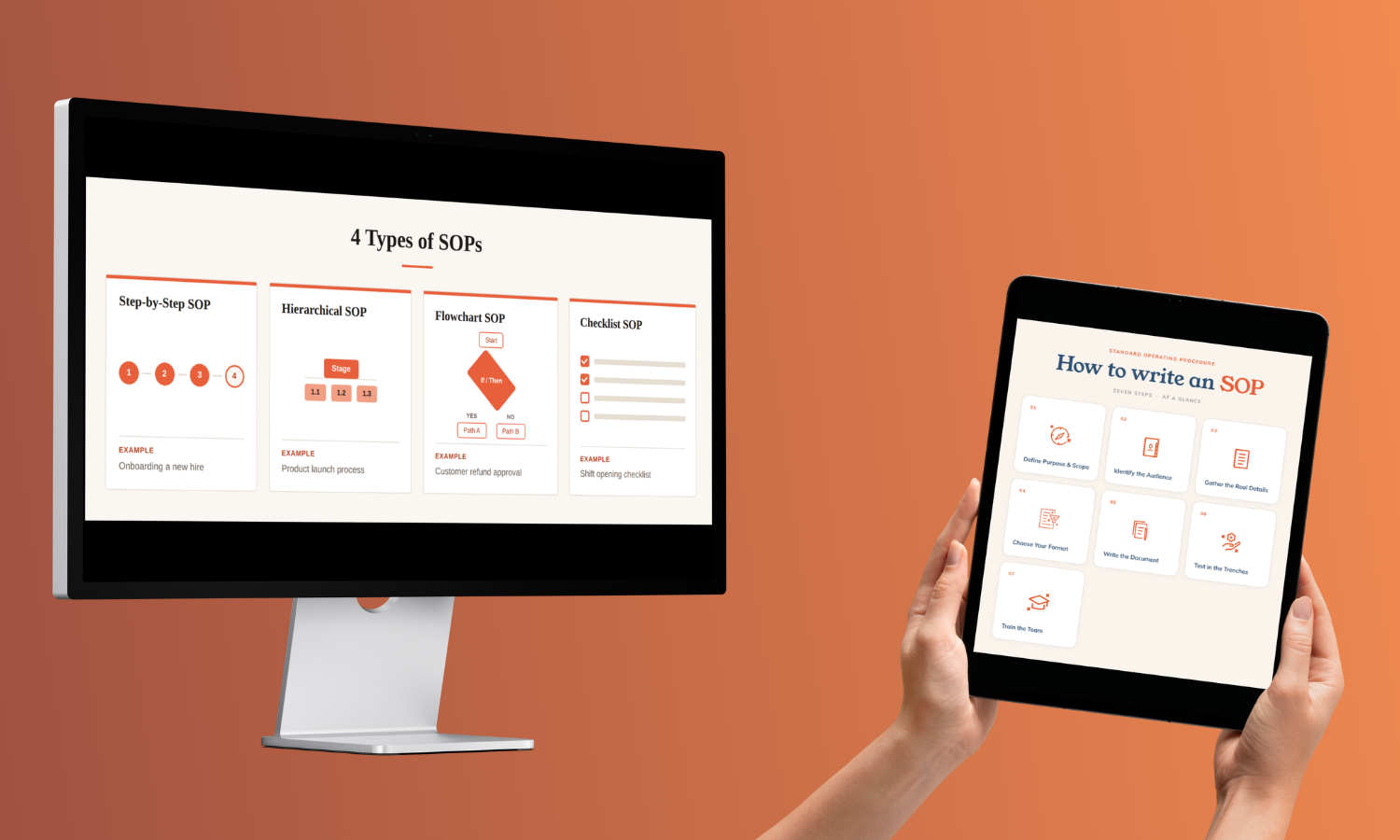
The right format for your SOP depends on the complexity of the task and how many decisions the person doing it has to make along the way. Here are the four most common formats with an explanation of when each one fits.
Simple Step-By-Step SOP
A numbered list of instructions, top to bottom. This is the workhorse format and the best choice for straightforward tasks where the person simply needs to do A, then B, then C.
Example: sending a weekly client status update. There are no judgment calls, just a clear sequence.
Hierarchical SOP
A step-by-step list where individual steps break down into substeps. Use this when a process is mostly linear but some steps need more detail than a single line can carry.
Example: a monthly financial close, where "reconcile accounts" expands into a handful of specific sub-tasks. The top level keeps the SOP readable; the substeps hold the detail.
Flowchart SOP
A visual diagram with decision points and branching paths. Reach for a flowchart when there are "if this, then that" forks in the road.
Example: a customer support escalation where the next action depends on the issue type, the customer tier, and whether a refund is involved. A flowchart makes those branches obvious in a way a linear list cannot.
Checklist SOP
A list of items to verify or complete, often used to confirm nothing was missed. Best for routine tasks that need verification rather than instruction, where the person already knows how to do each item but must make sure not to skip any.
Example: a pre-launch checklist before publishing a course or sending a campaign.
.png)
Many real SOPs blend formats: a step-by-step body with an embedded checklist at the end, or a flowchart that links out to detailed procedures for each branch. Match the format to the work.
How to Write an SOP: Step-by-Step Guide
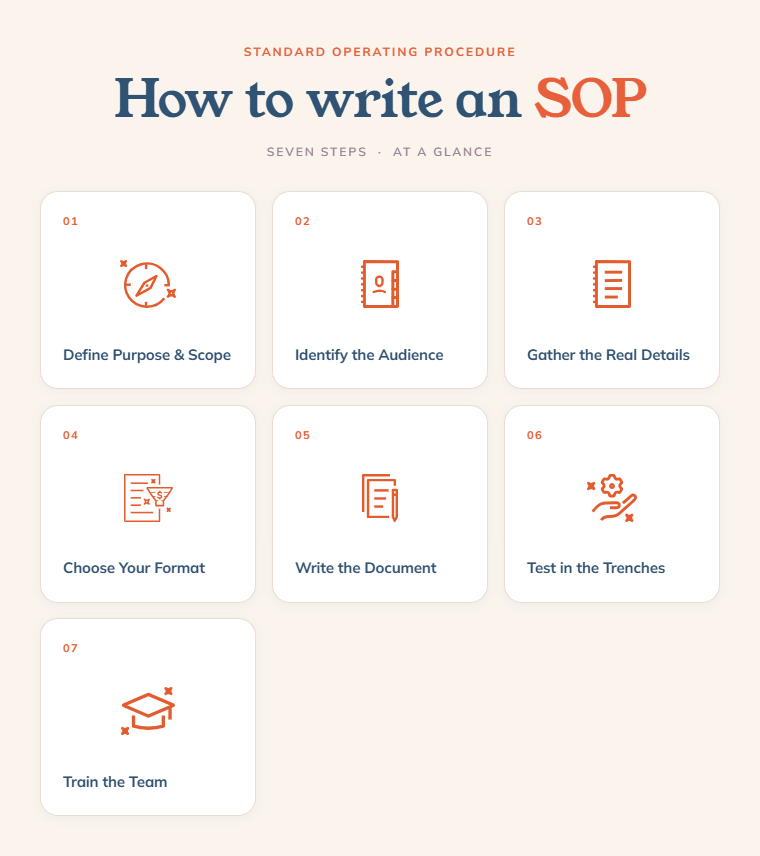
This is the heart of it: a repeatable, seven-step method for creating effective SOPs for your business. You can apply it to any process, from invoicing to onboarding and on.
Step 1: Define the Purpose and Scope of Your SOP
Before writing a single instruction, ask three questions: What problem does this SOP solve? Who is it for? And, just as important, what is in scope and what is out of scope?
Scope is where most SOPs go wrong. An SOP titled "client management" is too broad to be useful, because it tries to cover onboarding, communication, billing, and offboarding all at once. An SOP titled "how to onboard a new client" has a clear beginning and end. Define the boundaries explicitly: this procedure starts when the contract is signed and ends when the kickoff call is booked. Anything outside those edges belongs in a different SOP.
Step 2: Identify the Audience of Your SOP
Write to the level of knowledge of the people who will use the document. A procedure meant for a brand-new virtual assistant needs more context and screenshots than one meant for a seasoned team member.
When in doubt, write for the person who will join your team a year from now and has never seen this task before.
Step 3: Gather Info From the People Who Have It
You cannot write an accurate SOP from memory. Memory smooths over the exceptions and the "oh, and then I always check this one thing" details that matter most.
Instead, gather the information in three ways:
- Interview the people who currently do the work and ask them to talk you through it.
- Better yet, observe the process in action and capture every click and decision as they happen.
- And collect any existing documentation, notes, or screenshots.
Capture more detail than you think you need at this stage. It’s easier to trim an over-detailed draft later than to reconstruct a step you forgot.
Step 4: Choose Your SOP Format
Now return to the formats above and pick the one that matches the complexity of your process. A linear, no-decision task wants a simple step-by-step. A process with conditional branches wants a flowchart. A multi-layered procedure wants a hierarchical structure. A verification-heavy routine wants a checklist.
Choosing the format before you write saves you from cramming a branching process into a flat list, which is how SOPs become confusing. The format is the skeleton; get it right and the writing flows.
Step 5: Write Your SOP
With your information gathered and your format chosen, write the document. A complete SOP generally includes these sections:
- Title: clear and specific, naming the exact procedure.
- Purpose: 1-2 sentences on what this SOP accomplishes.
- Scope: what the procedure covers and where its boundaries sit.
- Roles and responsibilities: who does what within the procedure.
- Materials and tools needed: the software, logins, templates, or resources required.
- Step-by-step procedure: the actual instructions, in your chosen format.
- Revision history: dates, versions, and who last updated the document.
As you write the steps themselves, follow three rules that keep SOPs usable:
- Write in the active voice and lead with action verbs, so "click save," "send the email," "confirm the booking," rather than passive descriptions of what happens.
- Keep each step concise and limited to a single action, so steps do not blur together.
- Be specific: instead of "review the document," write "check that the client name, project dates, and scope match the signed contract."
Step 6: Get Feedback From the Trenches
A draft is a hypothesis. Test it before you trust it. Hand the SOP to someone who has never done the task and ask them to follow it without your help, while you watch. Resist the urge to jump in. Every place they hesitate, backtrack, or ask a question is a gap in the document.
This step is where SOPs go from "technically correct" to "ready to use." The person in the trenches will surface the assumptions you did not know you were making. Incorporate their feedback, then test once more if the changes were significant.
Step 7: Train Your Team On the SOP
Roll the SOP out with a short training and answer questions. Then store it somewhere central and easy to find.
From here, the SOP becomes a living asset. As your team uses it, they will spot improvements, and the document gets sharper over time.
SOP Best Practices
These practices are what keep an SOP working, and what separate documents people use from documents people ignore.
Keep it concise. If an SOP is too long or dense, nobody reads it. One marketing agency owner discovered her team was constantly inconsistent because her manual was so jargon-heavy that everyone avoided it. Include what is needed to do the task correctly, and cut everything else.
Use visuals. Screenshots, flowcharts, and short screen recordings often communicate a step faster and more clearly than a paragraph. A single annotated screenshot can replace ten lines of text.
Write for the end user. The document exists to help the person doing the work. Plain language beats polish.
Version-control. Track changes, dates, and who edited what. When a process updates, you want to know which version is current and what changed.
Schedule regular reviews. Set a recurring reminder to review each SOP every six to twelve months, or immediately after any major process change. Outdated SOPs teach the wrong thing with full confidence.
Use templates for consistency. When every SOP across your business follows the same structure, people know where to look for what they need. A shared template also makes new SOPs faster to write.
Give SOP maintenance an owner. Documentation goes out of date when keeping it current is "everyone's job," which means no one's job. Assign someone the explicit responsibility, even if it’s just an hour a month.
Standard Operating Procedure Examples
Seeing a finished SOP in condensed form makes the structure click into place. Here are three brief examples of standard operating procedures across different business functions. Each shows the core sections so you can picture what a real one looks like.
Example 1: Employee Onboarding (Hierarchical Format)
Purpose: Ensure every new hire is set up, trained, and productive by the end of week one.
Scope: Begins on offer acceptance, ends after the day-14 check-in.
Steps:
- Pre-arrival: create accounts, order equipment, send welcome email.
- Day one: office or systems tour, introductions, review role and expectations.
- Week one: assign starter tasks, pair with a buddy, walk through relevant SOPs.
- Day 14: hold a check-in to review progress and answer questions.
Example 2: Customer Support Escalation (Flowchart Format)
Purpose: Route every support issue to the right person quickly and consistently.
Scope: Starts when a ticket arrives, ends when the issue is resolved or escalated.
Steps:
- Assess issue type.
- If it is a standard question, the support rep answers using the knowledge base.
- If it involves a refund or billing, route to the accounts owner.
- If it is a technical fault, route to the technical lead.
- If unresolved within 24 hours, escalate to the manager.
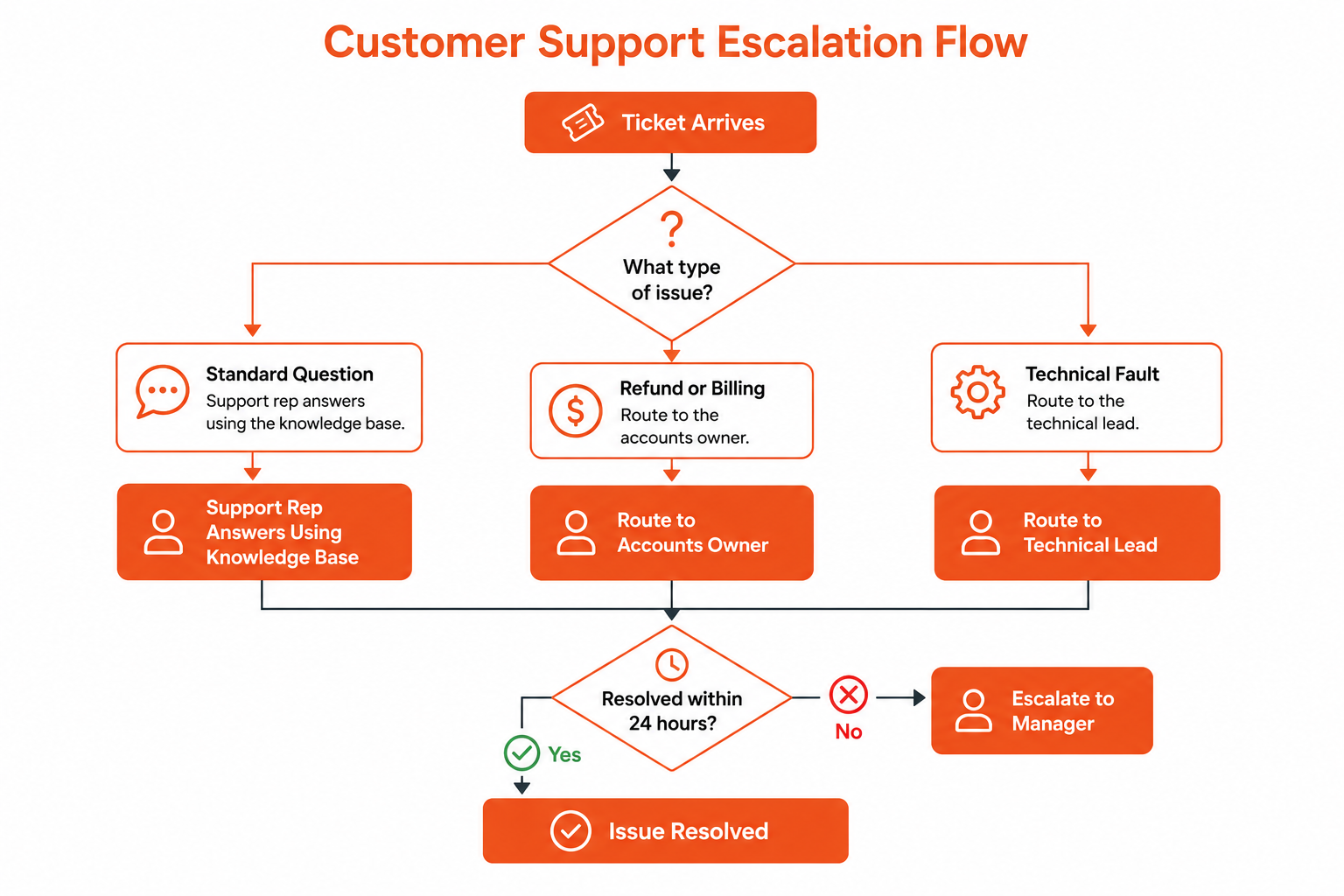
Flowchart routing support tickets by issue type to resolution or manager escalation within 24 hours
Example 3: Monthly Financial Close (Checklist Format)
Purpose: Confirm the books are accurate and complete before reporting.
Scope: Covers the close for one calendar month.
Steps:
- Reconcile all bank and payment accounts.
- Confirm every invoice is recorded.
- Categorize outstanding transactions.
- Flag and resolve any duplicates.
- Generate the profit-and-loss summary.
- Confirm the close with the accountant.
Notice how each example matches its format to its work: onboarding is layered, support escalation branches based on decisions, and the financial close is a series of checks. Giving your customers a stellar process is its own competitive advantage.
SOP Template
A simple, repeatable structure is enough to start with, no fancy software required. Reusing the same SOP template across your business is what creates consistency. Here’s an SOP template you can download and fill in for any process you want to capture.
Adapt the format as needed: you can turn the procedure section into a checklist for verification tasks, or add substeps for layered processes.
Let Day by Day Build Your SOPs for You
Writing one SOP is easy. Documenting an entire business, then connecting those procedures to the right tools so the busywork runs itself, is a much bigger project, and it is exactly the kind of work that keeps getting pushed to "someday."
That’s where Day by Day comes in. We sit down with you to understand how your work gets done, document the processes living in your head, and set up workflows and automations to handle them. If that sounds like something your business could use, let's talk SOPs.
FAQs About Writing SOPs
What is the best AI for writing SOPs?
The best AI for writing SOPs is the one paired with someone who actually knows the process. Tools like ChatGPT and Claude can speed up drafting and structure your notes, but they can’t observe how your team really works or catch the unwritten exceptions that make a procedure accurate. Use AI to accelerate the writing, but the source material still has to come from the people doing the work.
How long does it take to write an SOP?
It can take an hour or two to write a simple SOP; a complex one can take several days. The biggest variable is information-gathering, not writing. If you already understand the process and just need to document it, it’s fast. If you need to observe the work, interview people, and test the draft, plan for more time. Documenting an entire business is a project measured in weeks, not hours.
What are common mistakes to avoid when writing an SOP?
The most common mistake to avoid when writing an SOP is writing from memory instead of observing the actual process. Other frequent errors include making the document so long or jargon-heavy that nobody uses it, being too vague for a newcomer to follow, mixing policy statements with procedural steps, skipping the test with an unfamiliar reader, and failing to update the SOP once it is written.
How detailed should an SOP be?
An SOP should be detailed enough that someone unfamiliar with the task can complete it correctly, and no more. Match the level of detail to the complexity and risk of the process: a routine two-step task needs little, while a high-stakes or multi-decision procedure needs more. If a new person can follow it without asking you a single question, it’s detailed enough.
%20(1).png)
.jpg)