
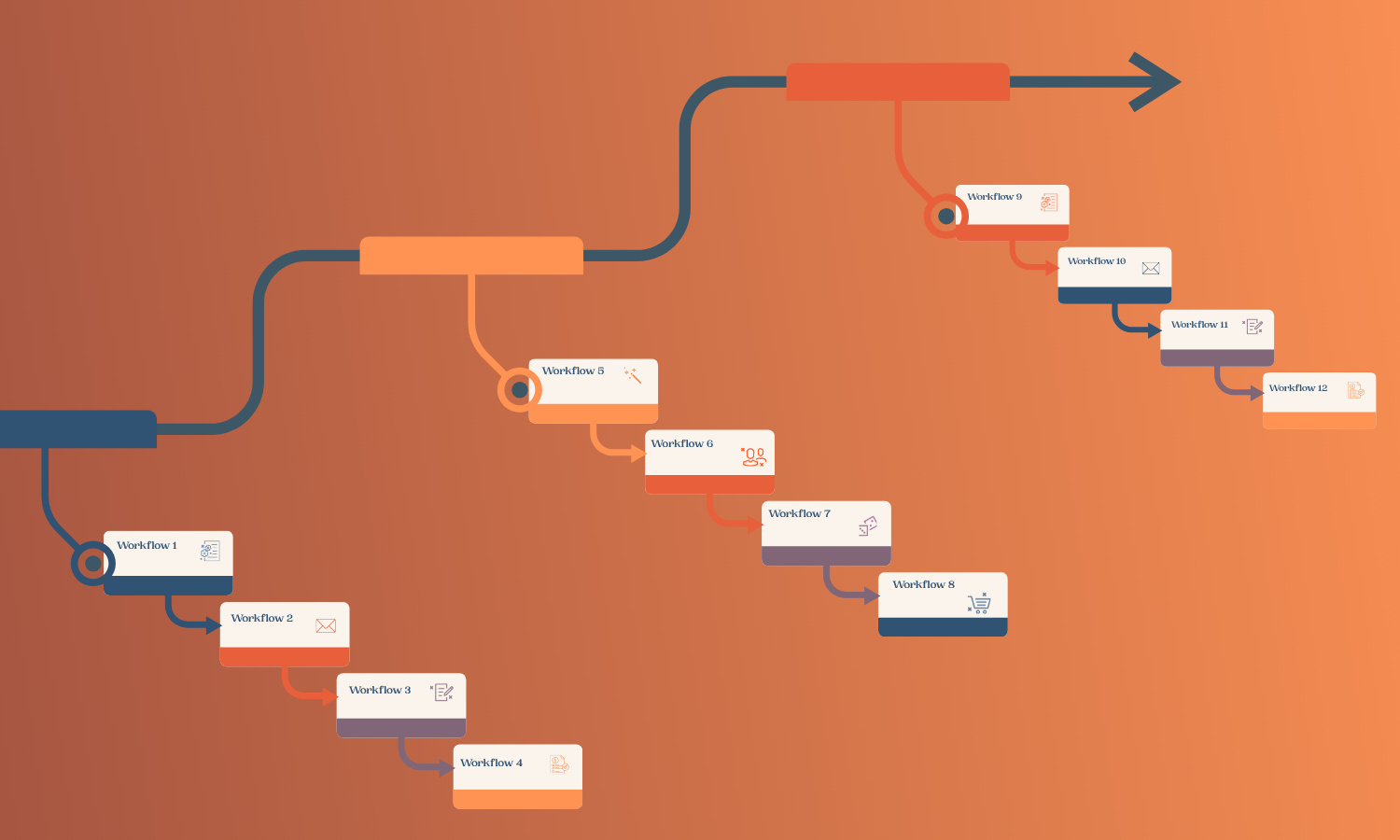
If you've sat in a meeting where someone used the words "process" and "workflow" as if they meant the same thing, you're not alone. The terms get swapped constantly, and in casual conversation, it doesn't really matter. But when you're trying to fix a system that's broken, or build a strategy that actually holds up as you grow, the distinction matters quite a bit.
Mixing a process and a workflow up often leads to solving the wrong problem. You might spend weeks redesigning a process when what's actually broken is a single workflow inside it. Or you might automate a workflow and wonder why the bigger operation still feels chaotic. Understanding what each one is and how they relate to one another gives you a much clearer view of what to fix and where to start.
That’s where we come in. At Day By Day, we cut through the confusion. We’ll break down your workflows and processes and rebuild them in a clear, structured, and easy-to-understand way.
Key Takeaways on Business Process vs Workflow
- A process is the broader strategic framework for achieving a business goal. A workflow is the specific sequence of steps that executes part of that process.
- Workflows live inside processes. A single process typically contains multiple workflows.
- Processes are flexible and evolve over time. Workflows are more precise and detail-oriented.
- When something goes wrong operationally, it's usually a workflow issue. When a business can't scale or align around a goal, it's usually a process issue.
- Both can be improved with the right tools, and both benefit from automation, but they require different approaches.
Defining Process and Workflow
These two concepts are related, and it's easy to see why people treat them as interchangeable. They both describe how work gets done. But they operate at very different levels of your business.
What Is a Process?
A process is a structured set of activities, often spanning multiple people, departments, or systems, designed to achieve a specific organizational goal. It's the big picture. For example, client onboarding and your sales pipeline are processes you likely already use.
Processes tend to be long-running and continuous. They evolve as your business grows, and they're designed to be repeated reliably over time. A process like hiring, for example, keeps running as long as your business exists. It'll look different at 5 employees than at 50, but the overarching goal, bringing the right people into the right roles, stays consistent.
Processes are also where your strategy lives. They reflect your business logic: how you serve clients, manage projects, and handle finances. When you define a process, you're essentially saying: "This is how we do this, and this is why."
What Is a Workflow?
A workflow is a specific, ordered sequence of tasks required to complete one defined outcome. It's the tactical layer. Where a process maps out the territory, a workflow gives you turn-by-turn directions.
Think of client onboarding as a process. Within that process, you might have a document collection workflow: a new client submits a form, the system creates a folder, an intake checklist is assigned, a confirmation email is sent, and a kickoff meeting is scheduled. Each step is defined, sequenced, and delegated. That's a workflow.
Workflows are task-focused. They're built for consistency and speed. They tell a specific person, or a specific system, exactly what to do next. They're also where automation tends to live. When you automate something in your business, you're almost always automating a workflow, or part of one.
A helpful way to understand the relationship is that a recipe is a workflow, while a full dinner is a process.
What Is the Difference Between a Process and a Workflow?
The main difference between a process and a workflow is structure and scope. A process defines a complete set of activities that achieve a business outcome. A workflow defines the ordered sequence of tasks within that process.
Here’s a table showing the main contrasts between the two:
Differences Between Workflow and Process
When something breaks, the distinction helps you diagnose the problem quickly. If one step in a sequence fails or slows down, that's a workflow problem. If an entire function isn't producing the right outcomes, that's a process problem. Put simply: fix the workflow when a step isn’t working, and redesign the process when the steps don’t fit together properly.
Similarities of Workflow and Process
Part of why these terms get confused is that they share many characteristics, such as:
- Both are repeatable
- Both are designed to create consistency
- Both benefit from documentation and suffer without it
- Both involve people, tools, and decisions
- Both can become bottlenecks when poorly designed
Workflows and processes both sit at the heart of how a business scales. A service business that can't articulate its processes can't effectively train new team members. A team without well-defined workflows is constantly improvising, which introduces errors, slows things down, and creates dependency on whoever knows the unwritten rules.
The other point of confusion is that workflows are sometimes described as processes in everyday language. An "approval process" often refers to what is technically a workflow. An "onboarding process" might refer to either the full strategic framework or a specific sequence of steps. Context usually tells you which is which, but when you're building or improving systems, being precise about the distinction pays off.
Types of Processes and Workflows in Businesses
Most business operations fall into a handful of recognizable categories.
- Operational processes are the ones that keep the business running day-to-day. Sales, service delivery, invoicing, client communication, and project execution all belong here. These are usually the first ones worth mapping and optimizing, because they touch clients directly and generate revenue.
- Management processes provide oversight and direction for operational work. Strategic planning, performance review, budget cycles, and reporting all fall into this category. They don't produce outputs that go directly to clients, but they shape how everything else runs.
- Support processes enable the operational and management layers to function. HR, IT, accounting, procurement: these are back-office functions that rarely get prioritized until something breaks.
Within each of these categories, you'll find workflows. Your sales process contains a lead intake workflow, a proposal workflow, a contract workflow, and a follow-up workflow, among others. Your project delivery process contains a kickoff workflow, a client update workflow, a deliverable review workflow, and a project close-out workflow. The workflows are where the actual work happens. The process is the container that gives them structure.
Tools for Optimizing Your Processes and Workflows
The right tools for optimizing your processes and workflows depend on what you're trying to accomplish and at what level. The most important thing to know about tools is that no single platform manages both processes and workflows equally well. That's why all-in-one solutions often disappoint: they try to do everything and end up doing nothing particularly well. The better approach is to match the right tool to the right job and make sure your tools communicate with each other.
Solutions For Process Mapping and Documentation
Visual tools help you see the whole picture. At Day By Day, we often start here because it's hard to fix what you can't see. A well-documented process map shows you what's actually happening versus what's supposed to happen, and the gap between the two is often where the most time and energy is being lost. Tools like Lucidchart, Miro, or even structured docs in Notion make it easier to map this out clearly and collaboratively.
Systems For Workflow Management and Automation
Tools like Airtable let you build structured databases that act as the operational backbone of a workflow. With Airtable's Interface Designer, you can create navigable workspaces that feel purpose-built for the people using them. Paired with an automation middleware tool like Zapier or Make (formerly Integromat), you can trigger actions, send notifications, move data between systems, and eliminate the man**l steps that slow everything down.
Tools For Project-Based Workflows
Dedicated project management tools like Asana, ClickUp, or Trello give teams visibility into task status, assignments, and deadlines. These work well when each project is unique, but for recurring workflows, a database-driven approach usually holds up better.
Platforms For Client-Facing Workflows
Particularly in service businesses, forms, scheduling tools like Calendly, or OnceHub and e-signature tools like DocuSign create cleaner hand-offs and reduce back-and-forth. The goal is to get information into the right system at the right time, without anyone having to chase it down man**lly.
Tips for Efficient Processes and Workflows
Before you automate anything, take time to map what’s really happening. Go step by step through your current workflow, and you’ll quickly spot inefficiencies. Start by fixing the areas that create the most friction and make sure the people doing the work have a say. Systems only stick when they make sense in practice.
As you build, keep the big picture separate from the details. Processes should guide direction, while workflows handle execution. Document along the way so knowledge isn’t trapped in one person’s head, and your business can run smoothly at any time. Most importantly, revisit your systems regularly. What works now won’t always work later, and small updates can prevent bigger problems down the line.
Drive Success by Optimizing Your Process and Workflow
Getting clear on the difference between processes and workflows is essential for your business. It's one of the most practical tools you have for diagnosing what's broken, deciding what to fix, and building systems that hold up as your business grows. Most of the businesses we work with at Day By Day come in knowing something is off, but not exactly where the problem lies.
If you're at the stage where your operations are running on tribal knowledge, man**l steps, and tools that don't quite talk to each other, it's worth taking a proper look at both layers. Workflow Consulting at Day By Day is built around exactly this kind of structured analysis: mapping what's there, identifying what's missing, and building systems that support your growth rather than slow it down.
You don't have to redesign everything at once. Most of the time, fixing a handful of key workflows produces dramatic results, and those quick wins build the foundation for stronger processes.
FAQs on Workflow Automation vs Process Automation
What is the main difference between a process and a workflow?
A process is the broader framework for achieving a business goal, often spanning multiple teams and functions. A workflow is a specific, ordered sequence of tasks that executes part of that process. Workflows live inside processes.
How can automation improve workflow efficiency?
Automation removes the manual, repetitive steps from a workflow: sending notifications, updating records, routing documents, and triggering follow-ups. When those steps happen automatically, the workflow runs faster and more consistently, and almost always with fewer errors. It also frees up the people involved to focus on the parts of the work that actually require human judgment.
Why is optimizing business processes and workflow management important for organizations?
Optimizing business processes and workflow management improves efficiency, reduces costs, and increases output quality. Brands streamline tasks and eliminate redundancies, resulting in reduced errors, thanks to automation and standardization. Optimized workflows also improve decision speed and scalability, increasing customer satisfaction by delivering faster, more consistent results.
How are workflows organized in project management?
In project management, workflows define the sequence of tasks required to move a project from kickoff to completion. They specify who does what, in what order, and what needs to be in place before the next step can begin. Project management tools visualize these workflows, track progress, and help teams identify where things are getting stuck. For recurring project types, standardized workflow templates ensure consistency from one project to the next.


.png)


