I'll be upfront with you: I'm an ActiveCampaign fan. Have been for years. And no, that's not a sponsored opinion. It's the tool I recommend to almost every client who needs serious email marketing automation, and it's the tool I use myself at Day by Day.
But this isn't going to be a love letter. A lot has changed since I first switched from Mailchimp, and not all of it is good. Pricing has crept up, the feature set has grown more complex, and some genuinely useful things have been quietly shuffled behind higher-tier paywalls. So let me give you the honest, no-fluff version.
Key Takeaways on My ActiveCampaign Review
- ActiveCampaign's automation builder is still one of the best in the market.
- The Plus plan is the sweet spot for most small service businesses. The Starter plan is too limited; the Pro plan is where costs start jumping.
- WhatsApp is available as a native add-on from Plus onward; this is one of the most significant differentiators at this price point.
- Pricing has gotten more aggressive, especially since November 2025, when they started charging for all contacts.
- If you're still on Mailchimp because it's free or you’re familiar with it, this review is very much for you.
- ActiveCampaign is not the right tool for everyone. I'll tell you exactly who should use it and who shouldn't.
ActiveCampaign Plans and Pricing
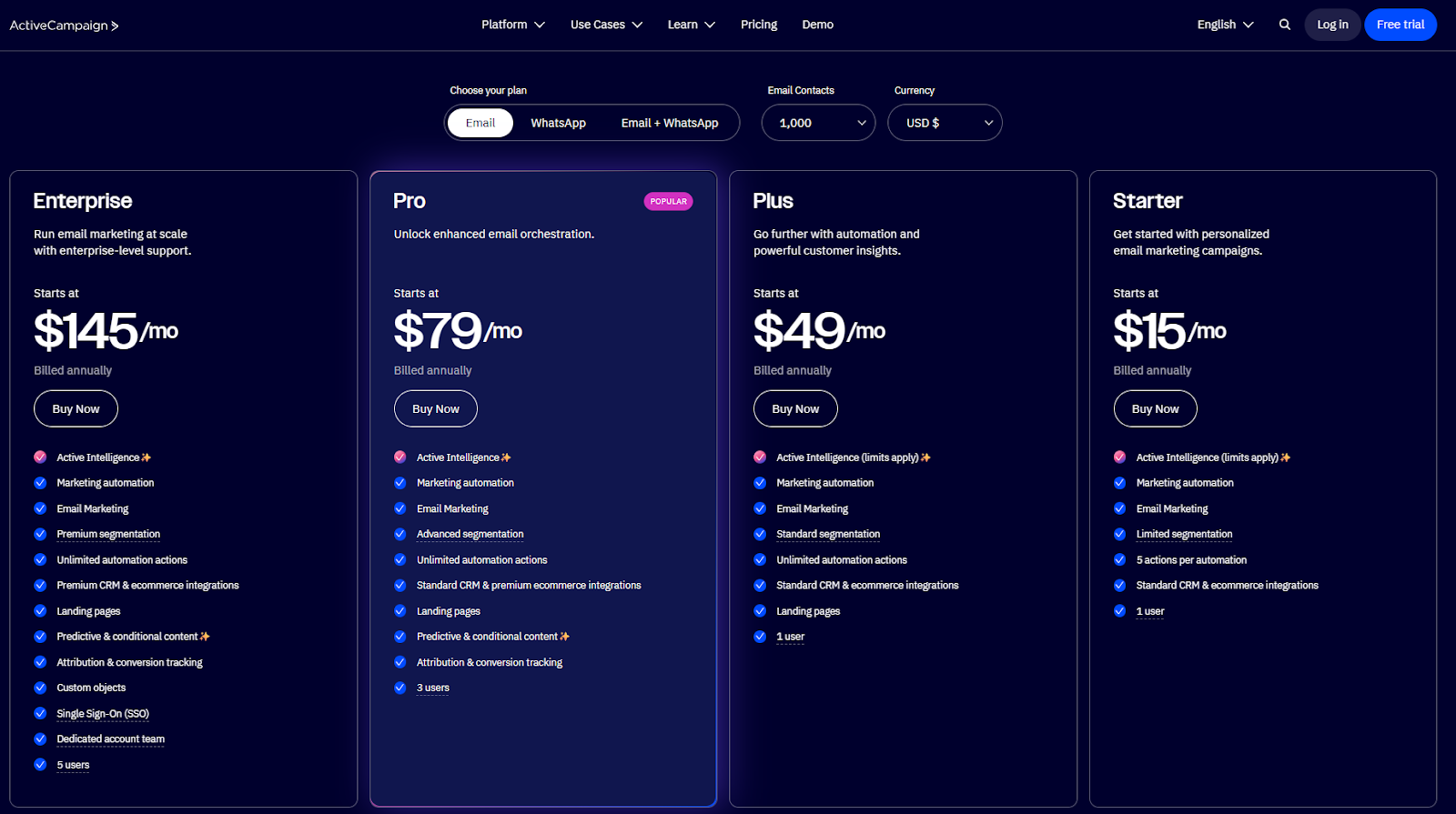
ActiveCampaign currently has four plans: Starter, Plus, Pro, and Enterprise. Pricing is contact-based, meaning your price increases as your list grows.
Here's a snapshot of 1,000 contacts on annual billing:
Starter:
~$15/month
Highlights: Basic email + limited automation (5 actions per flow)
Plus:
~$49/month
Highlights: Full automation, CRM, landing pages, generative AI
Pro:
~$79/month
Highlights: Predictive sending, AI content, advanced reporting
Enterprise:
~$145/month
Highlights: Custom reporting, dedicated support, enterprise security
Points Worth Noting Before You Pick a Plan
The Starter plan is seriously limiting. Five actions per automation sounds like enough until you try to build anything meaningful. You also lose access to CRM tools, landing pages, advanced segmentation, and ActiveCampaign predictive sending. If you're scaling a service business, you'll outgrow Starter within weeks.
My recommended plan for most clients is Plus. Full automation, built-in CRM, landing pages, and the ability to add SMS. This is where ActiveCampaign starts to justify its price tag. The CRM is good for growing teams, but it’s not the main reason I’d go for this plan. The full automation is where this plan shines.
The Pro plan makes sense if you want AI. Predictive sending, win probability scoring for deals, and more advanced analytics all live here. If you're actively managing a sales pipeline and want machine learning to help you prioritise leads, Pro is worth considering.
The November 2025 billing change matters. ActiveCampaign now charges for all contacts, not just active ones. If you have a large list with many unsubscribed or bounced contacts and haven't cleaned it recently, your bill just got more expensive. This is the biggest frustration I've heard from longtime users.
Annual billing gives you a 20% discount. Non-profits get an additional 20% off. There's no free plan, but there is a 14-day free trial (based on the Pro feature set, which is useful for evaluating the platform properly).
ActiveCampaign Email Marketing Platform Pros and Cons
Before diving into the specifics, here’s a clear look at where ActiveCampaign shines and where it may fall short.
What ActiveCampaign does really well:
- The automation builder is simply excellent. Visual, drag-and-drop, with 135+ triggers and actions, and over 900 pre-built automation templates. You can build almost any workflow you can imagine.
- Deliverability is consistently strong, with robust spam testing, list management tools, and built-in bounce suppression.
- The CRM integrates directly with your marketing automations, so you can trigger emails based on where deals are in your pipeline. No separate tool needed for most small teams.
- Over 950 integrations, including deep native integrations with Shopify, Salesforce, and Zapier.
- Segmentation is ultra-powerful. Lists, tags, and custom fields work together in a way that most ESPs can't match. You can slice and dice based on email behaviour, website visits, CRM data, custom date fields, and automation activity - all at once, in the same segment builder.
- AI features on the Pro plan (predictive sending, content suggestions, win probability) are legitimately useful, not just marketing fluff.
- WhatsApp is available as a native add-on, which is unbelievably rare at this price point. For WhatsApp audiences, this is major.
Where this ESP falls short:
- Pricing scales aggressively as your list grows. A 10,000-contact list on Plus will cost significantly more than entry-level pricing suggests.
- The ActiveCampaign Starter plan feels artificially limited. It exists as a price anchor more than a useful product tier.
- Support quality has declined, according to a number of longtime users. Live chat isn't available 24/7, and some reviews note slower response times than in previous years.
- There's a real learning curve. ActiveCampaign is a sophisticated platform, and new users should budget 2 to 4 weeks to get comfortable before expecting to use it effectively.
- A/B testing isn't native to automation workflows. You can split-test email broadcasts, but testing different automation paths requires workarounds.
- Since November 2025, you're paying for contacts who aren't engaging. Keep your list clean, or your costs will creep up faster than expected.
In-Depth ActiveCampaign Feature Review
Choosing an ESP means understanding the nitty-gritty details to determine if it’s right for your business. Read on as we examine each feature and the specifics of the ActiveCampaign pros and cons.
ActiveCampaign marketing automation
This is where ActiveCampaign earns its reputation. The visual automation builder lets you create branching workflows based on almost any combination of contact behaviour, tags, CRM data, list membership, or custom events.
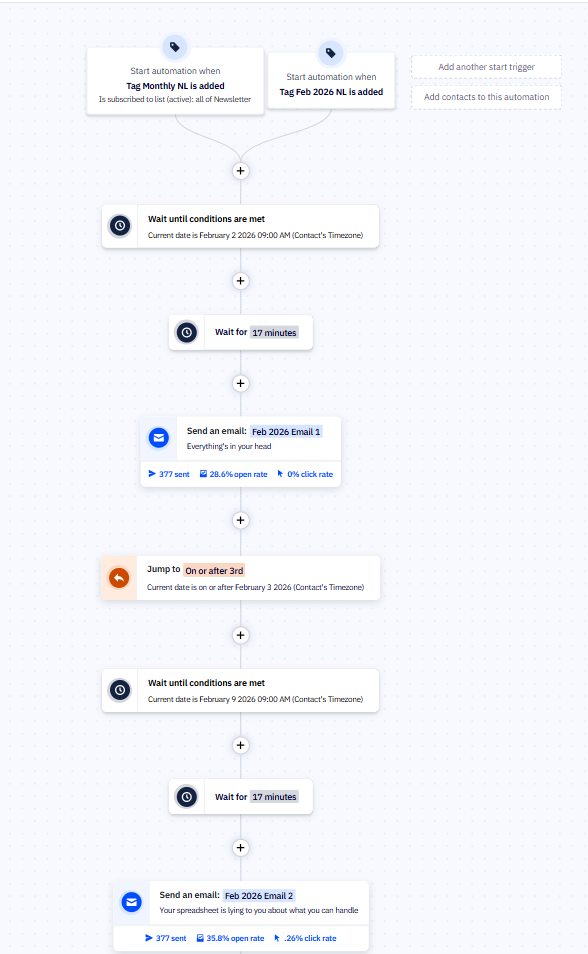
You can send emails, update deals, score leads, send SMS messages, and notify your sales team, all within a single automation.
The quality of the pre-built templates is really useful. These aren't generic placeholder flows; they cover specific use cases like post-purchase follow-up, webinar registration sequences, and lead-nurture campaigns. They're a strong starting point, even if you end up customising heavily.
What I particularly appreciate is the flexibility for service businesses specifically. You can build automations that respond to intake form submissions, onboarding milestones, or client activity on your website. When you connect your CRM and email marketing in one place, you stop managing the handoff between tools and start managing actual relationships.
One legitimate limitation: A/B testing within automations isn't as seamless as in email broadcasts. You can use conditional splits to approximate testing, but it requires more setup than it should.
My Verdict:
9/10. Still best-in-class for small to mid-sized service businesses that need solid automation depth.
Custom Fields and Segmentation
Custom fields and segmentation are among the things that separate ActiveCampaign from most other ESPs, and it doesn't get talked about enough.
Most email tools let you tag contacts and maybe filter by a few basic properties. ActiveCampaign gives you a three-layer system: lists, tags, and custom fields, and the combination of all three is where the real power lives.
Lists
Lists are your broadest grouping; think of them as the audience type that opted in to a specific type of communication. Unlike some platforms that treat everything as one big blob, ActiveCampaign lets you maintain multiple lists with proper separation. A contact can live on several lists simultaneously, each with their own subscription status, which matters a lot when you're managing different services or audience segments.
Tags
Tags layer on top of lists. They're lightweight, easy to add or remove via automation, and great for capturing behaviour or status in real time: attended a webinar, clicked a specific link, is mid-onboarding, expressed interest in a specific service.
Custom fields
Custom fields are where it gets truly impressive. You can create text fields, dropdown menus, checkboxes, radio buttons, and date fields, and all of them are available as conditions in the segment builder, in automation if/else forks, in automation goal conditions, and for personalization tokens inside your emails.
The date field capability specifically is something I haven't seen done this well elsewhere. You can store a custom date for each contact - a contract renewal date, a consultation date, an onboarding milestone, a course start date - and then build an entire automation around it. The automation can trigger before, on, or after that date, and the "wait until custom date field matches" action means contacts will queue in the automation and move at exactly the right moment, individually, without you touching anything. It's dynamic personalization at scale, and for service businesses managing client timelines, this is powerful.
Put all three layers together, and you can build a segment like: contacts on your "active clients" list, tagged as "project in progress," with a contract renewal date within the next 30 days. Then trigger a check-in sequence automatically. That's the kind of thing that used to require a proper CRM and a developer. In ActiveCampaign, it's a few clicks in the segment builder.
My Verdict
9/10. Best-in-class for service businesses. The date-based custom field capability alone is a feature most people don't discover until they really dig in, and once you do, it changes how you think about automation entirely.
Email Marketing
ActiveCampaigns’ email editor is clean, intuitive, and produces professional results. You get 240+ templates, a drag-and-drop builder, and conditional content blocks that let you show different content to different segments within the same email. That last feature is a game-changer for businesses with varied client types.
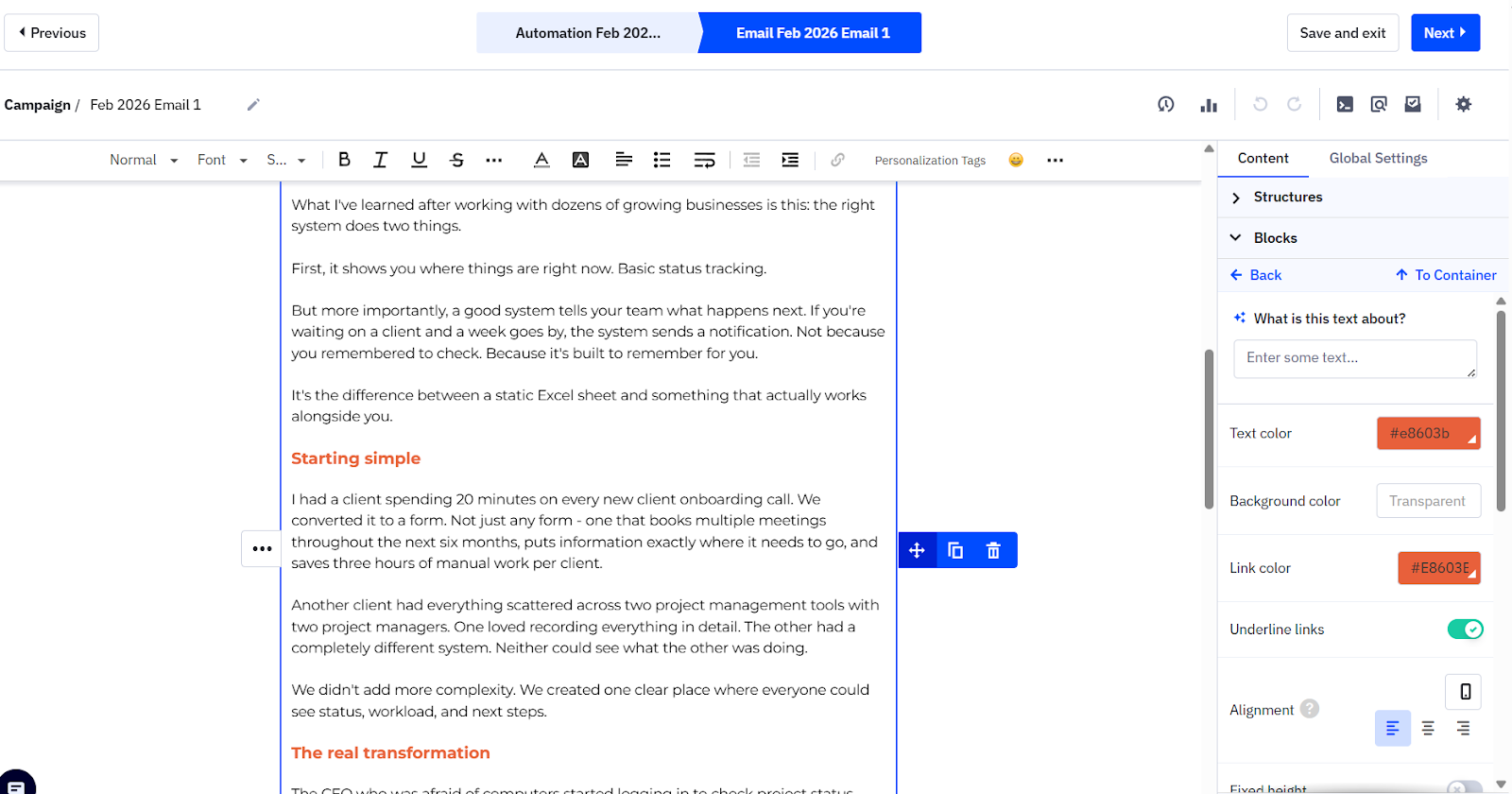
Personalization is deep. Beyond first name tokens, you can pull in CRM field data, reference website behaviour, and dynamically adjust content based on a contact's history with your business.
The email client preview tool shows you how your email renders in Gmail, Outlook, Apple Mail, iPhone, and iPad. Starter users pay per preview; Plus and Pro get a small number of free previews each month; Enterprise gets unlimited. (Another way they’re charging more 😡. Seriously, this is wrong!)
Deliverability is a consistent strength. ActiveCampaign has a solid sender reputation infrastructure, and the platform handles bounce and complaint suppression automatically. If you're coming from a tool with poor deliverability, this is an important upgrade.
My Verdict
8.5/10. Not the prettiest editor in the market, but the conditional content and personalization capabilities put it ahead of most competitors.
CRM
ActiveCampaign's built-in CRM is available from the Plus plan onward (as an add-on to the base email plan). It gives you pipeline management, deal tracking, contact notes, and the ability to trigger automations directly from deal-stage changes.
For small service businesses managing a handful of active prospects at any given time, this is more than enough. You can see which leads opened your last three emails, visited your pricing page, and are sitting at the proposal stage in your pipeline, all in one view. That kind of visibility is what helps you prioritise outreach without a separate CRM subscription eating into your budget.
ActiveCampaign CRM review:
It's not Salesforce. It's not HubSpot. If you have a large sales team running complex multi-step pipelines, you might eventually outgrow it. But for coaches, consultants, and service providers who want lead tracking without the coordination tax of managing multiple tools, the built-in CRM does the job well. The main benefit is the WhatsApp integration, which can potentially really make an impact in the sales process.
My Verdict
7.5/10. Solid for small teams. The win probability scoring on Pro is a seriously useful add-on if you have active sales conversations happening. But overall, I’m not sure I’d pay more for it. (I personally prefer my CRM live in Airtable, just saying 😉)
Reporting
Reporting is functional but not the flashiest part of the platform. You get open rates, click rates, unsubscribe data, and automation metrics across all plans. Revenue reporting and attribution, as well as custom dashboards, are gated to higher tiers.
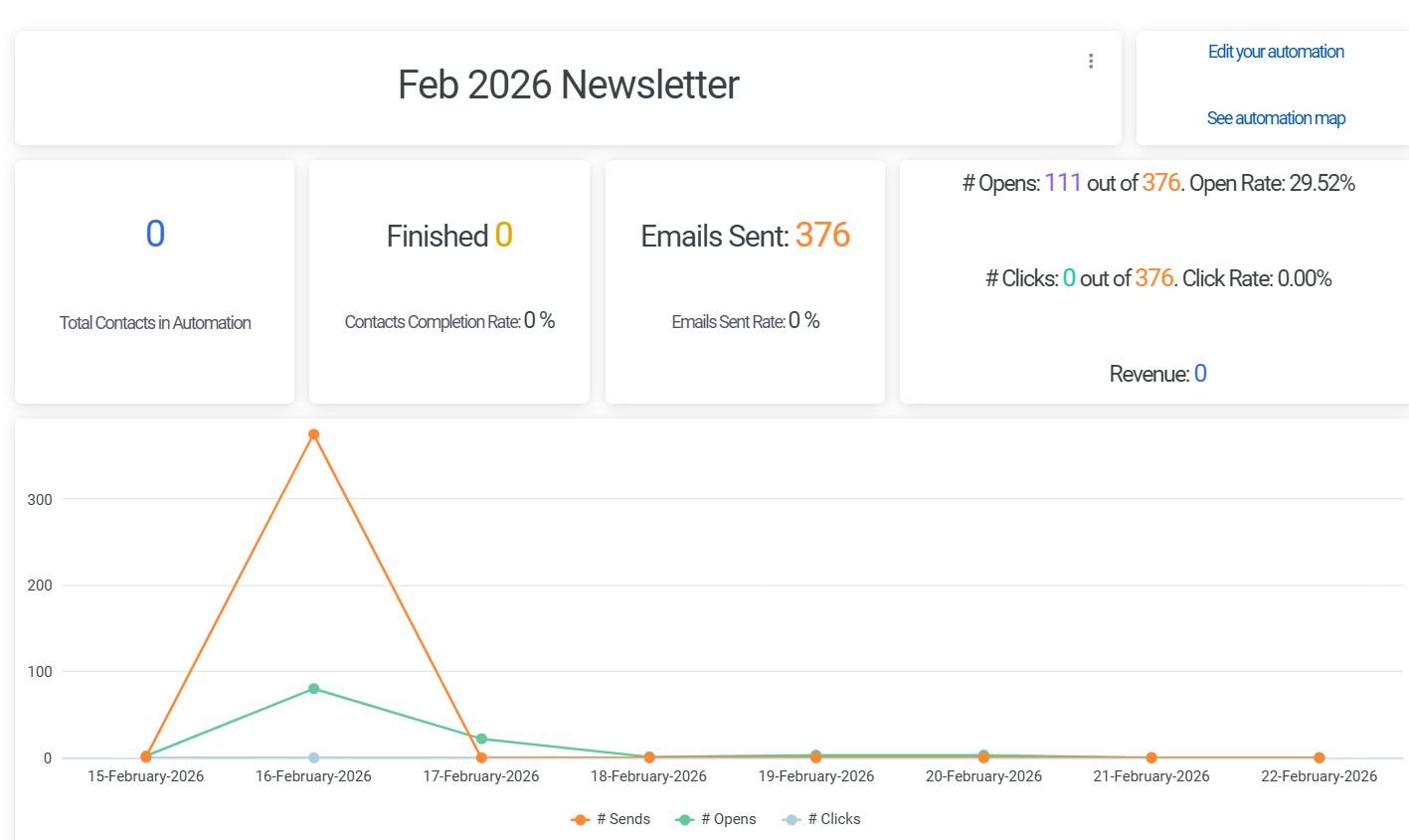
On the Pro and Enterprise plans, reporting gets much richer, with funnel reporting and automation performance analysis, and even predictive analytics. For most small service businesses, the standard reporting is sufficient to make good decisions. Where it gets super useful at the higher tiers is if you're actively optimising a complex funnel.
One limitation worth knowing: spam testing gives you a pass/fail result without detailed diagnostic information. Useful to know before sending, but not particularly actionable if you fail.
My Verdict
7/10. Gets the basics right and becomes quite dynamic at the Pro level, but the gap between tiers is noticeable.
Landing Pages
Landing pages were added a few years ago and have improved steadily since. They're available from the Plus plan onward and allow you to build lead capture pages, webinar registration pages, and opt-in sequences without a separate tool.
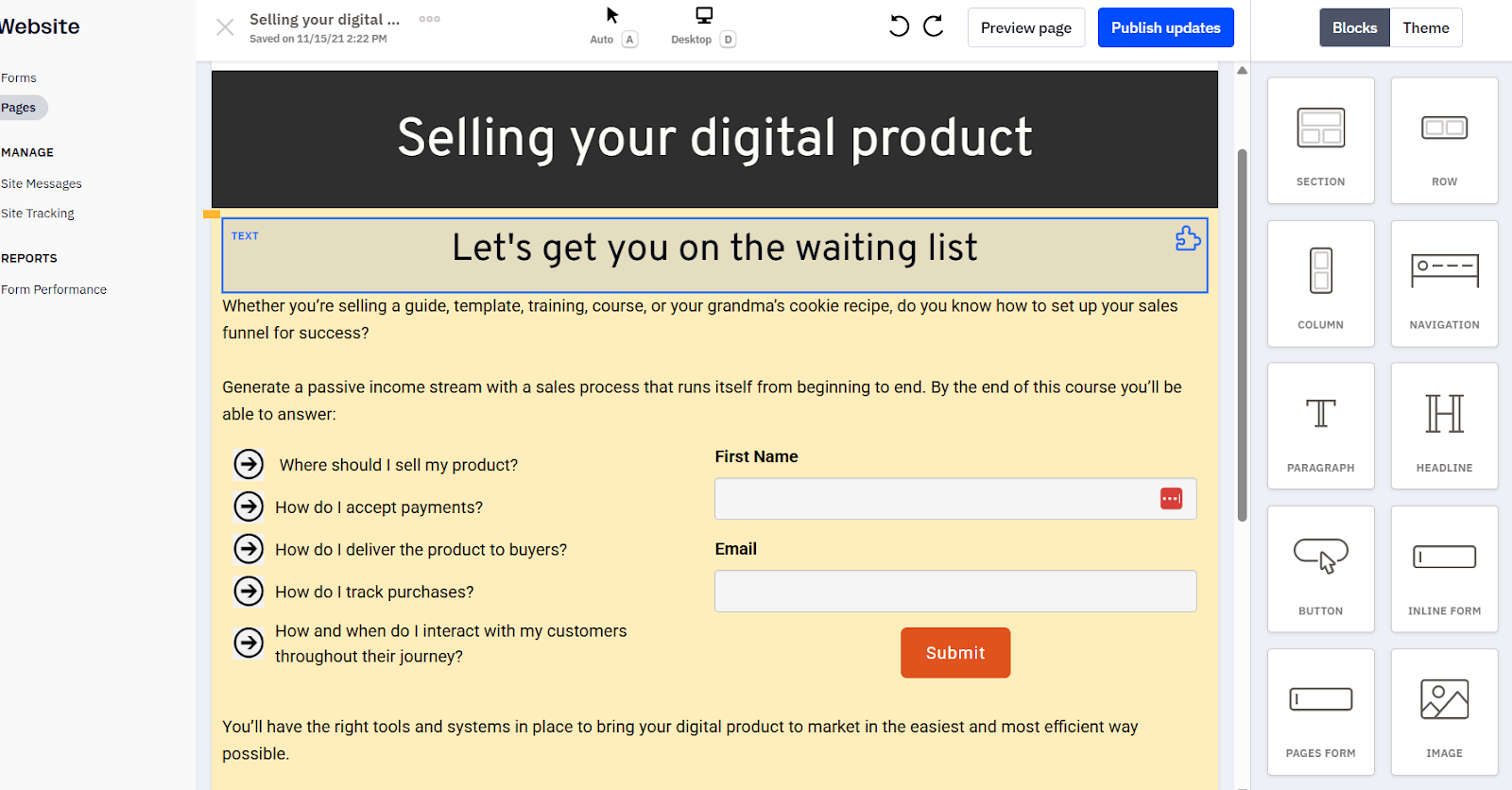
I'll be honest: I still prefer dedicated landing page tools for complex funnel builds. Unbounce, for example, gives you more design flexibility and more advanced scripting options. And using ThriveCart gives you amazing capabilities, including advanced payment portals. But for small service businesses that don't need elaborate pages and don't want to pay for another platform, the built-in landing pages are a perfectly good solution. They connect directly to your contacts and automations without any additional setup.
My Verdict
7/10. Competent and convenient. Not a replacement for a specialist tool if you need advanced landing page functionality.
Forms
ActiveCampaign offers inline forms, floating bars, floating boxes, and modal popups. The catch is that everything except inline forms is paywalled behind Plus and higher plans.
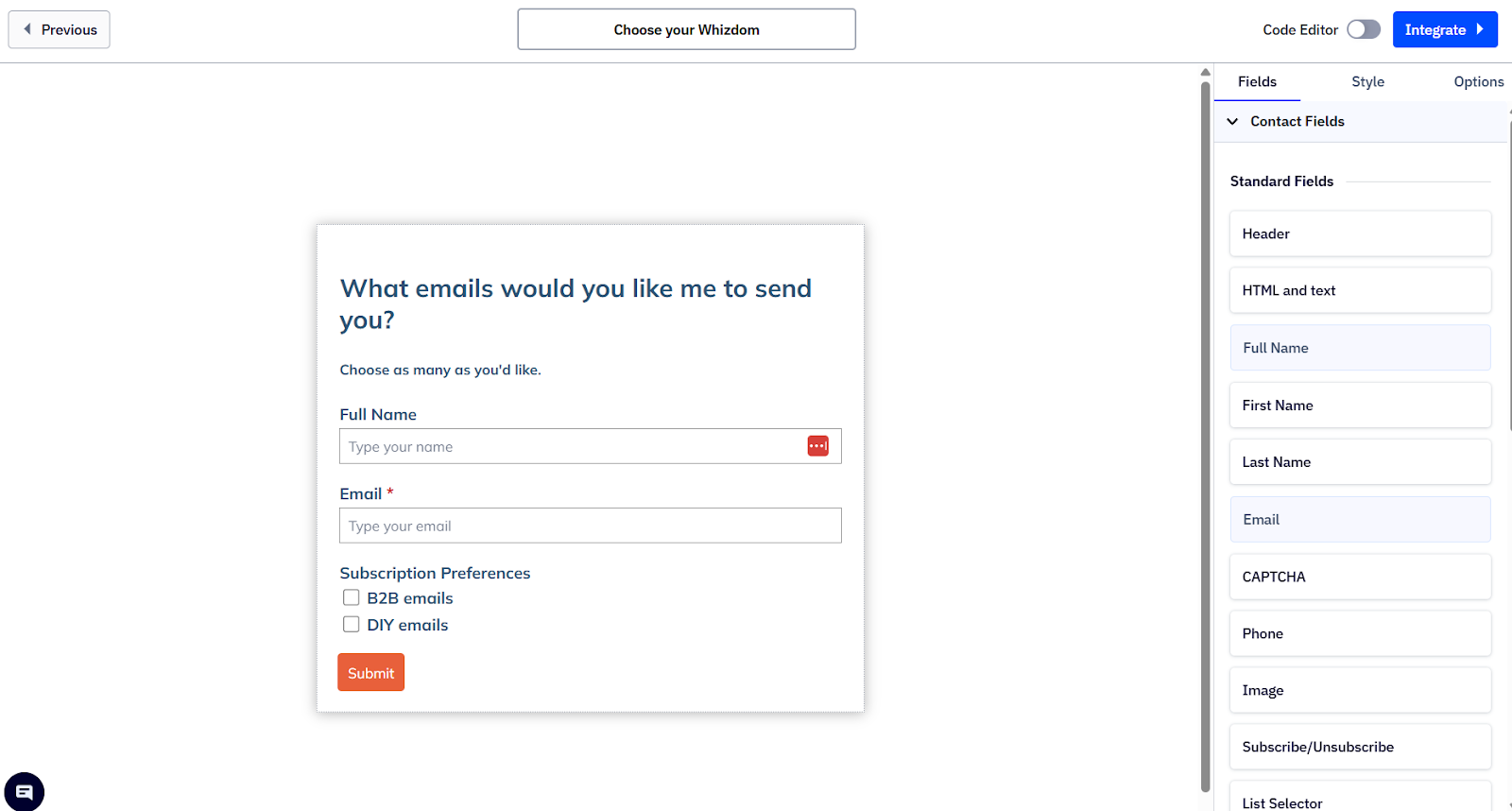
If you're on Starter and want anything beyond a basic embedded form, you'll need to upgrade. (You can build a workaround and embed the form on your website, but it’s more work.)
Form customization is solid, with conditional fields and the ability to tag contacts and trigger automations immediately on submission. For most use cases, the form builder handles what you need.
My Verdict
7/10. Good functionality on Plus+; Starter is too limited for useful lead capture.
This is one of the features I'm most excited about, and honestly, one that doesn't get nearly enough attention in most ActiveCampaign reviews.
ActiveCampaign offers WhatsApp as a native add-on, available from the Plus plan onward. In April 2025, they acquired Hilos, one of the most advanced WhatsApp automation platforms on the market, and have been integrating it directly into the ActiveCampaign platform. The goal is to let you build WhatsApp automations in the same interface you use for everything else: email, CRM, pipeline, all of it.
Why Is WhatsApp Useful?
The WhatsApp advantage is immense because a huge portion of the people your business communicates with don't live in their email inboxes. They live on WhatsApp. Especially if you work with clients outside of the US, WhatsApp is often the primary channel. Being able to trigger automated WhatsApp messages based on lead behaviour, deal stage, or onboarding milestones, without bolting on a separate tool, is incredibly useful.
With the add-on, you can build automated chat flows that qualify leads, respond to common questions, and guide people through a journey entirely within WhatsApp. Contact responses feed directly into your CRM. You can tag contacts based on their answers, route them to the right team member, and keep everything visible alongside your email and sales activity.
WhatsApp Points Worth Knowing
WhatsApp is priced separately from the email plans, and some message types incur additional per-message fees (Meta sets these). It's not free, and you'll want to budget for it properly. But for service businesses whose clients communicate primarily via WhatsApp, this is the kind of feature that can transform how you work.
I should also be transparent here: other platforms do offer WhatsApp. Brevo and Klaviyo both have it, and HubSpot does too (at significantly higher price tiers). But one of the best ActiveCampaign benefits for small service businesses is that you get WhatsApp alongside a proper automation builder, without paying enterprise prices.
My Verdict
8.5/10. Still maturing after the Hilos acquisition, but the direction is right. If WhatsApp is a real channel for your business, this alone might be the feature that makes the decision for you.
Support
This is where I have to be honest: ActiveCampaign support has gotten worse. ActiveCampaign offers live chat and email support, but not 24/7, and a number of users have noted slower response times in recent reviews.
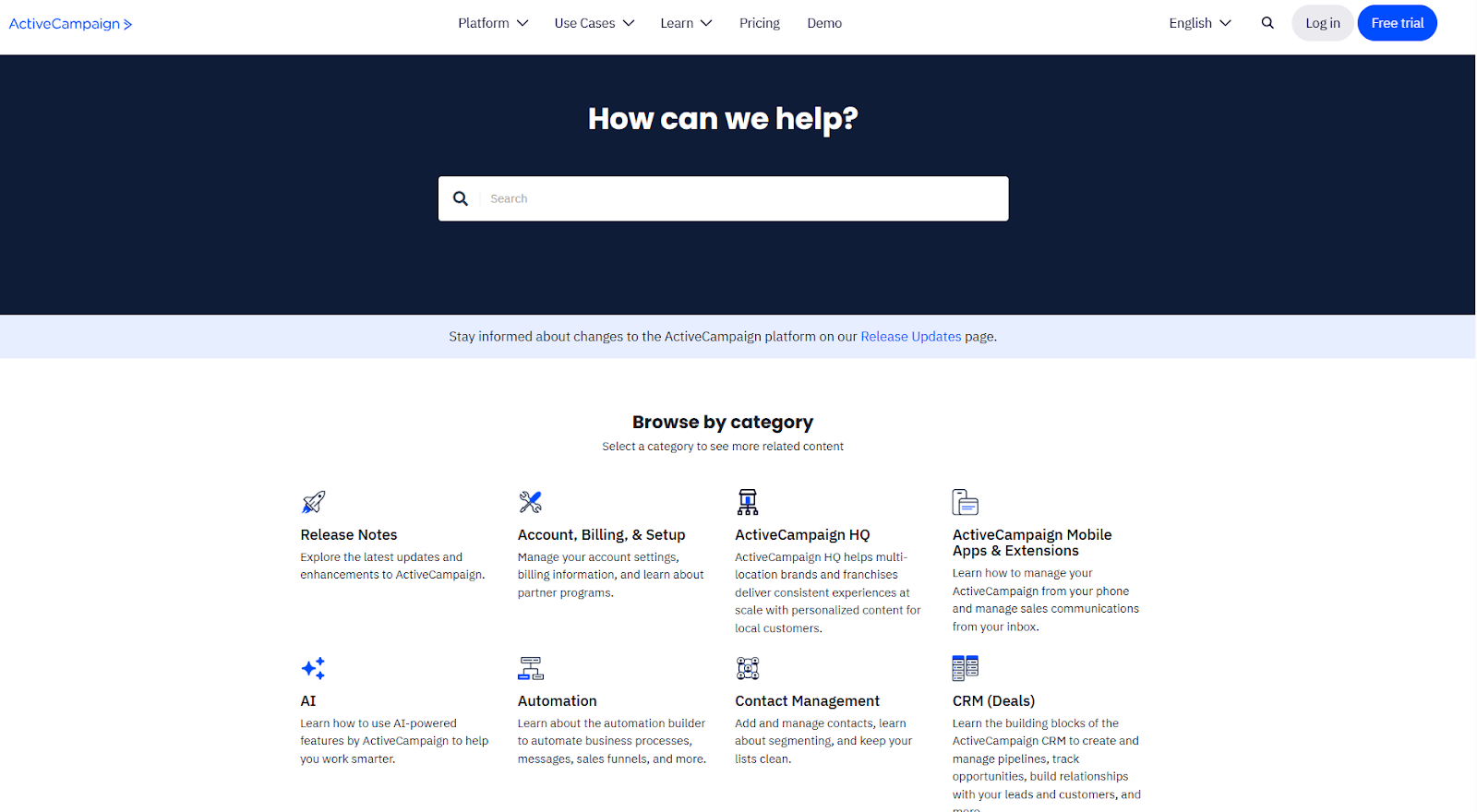
For the price point, this is a legitimate frustration.
What does hold up well is the self-service side. The knowledge base is extremely comprehensive, and there's a solid library of tutorials and webinars. If you're willing to look for answers yourself, you can usually find them. But if you need fast, responsive support when something breaks, the experience is inconsistent.
Phone support is not available.
My Verdict
6/10. The knowledge base is strong. Live support needs work.
Is ActiveCampaign The Right ESP For Your Business?
ActiveCampaign is a good fit if:
- You need proper marketing automation and not just email newsletters. If you want behaviour-based triggers and branching workflows, as well as the ability to connect your marketing to your sales pipeline, ActiveCampaign is built for this.
- A significant portion of your clients or leads communicate via WhatsApp. The native WhatsApp add-on is rare at this pricing, and being able to automate across both email and WhatsApp from one platform is a big advantage.
- You're a service business managing both marketing and sales, looking to avoid paying for a separate CRM.
- You're currently using Mailchimp and hitting its limits. If you're paying for Mailchimp beyond the free tier, you should almost certainly be looking at ActiveCampaign instead. You get significantly more automation capability for a comparable or slightly higher cost.
- You have at least a few hundred contacts and are actively growing your list.
ActiveCampaign is probably not the right fit if:
- You just need to send a simple monthly newsletter with no automation. There are cheaper, simpler tools for that.
- You're a very early-stage business with minimal email activity. Wait until you actually need what ActiveCampaign offers before paying for it.
- Budget is extremely tight, and you can't justify even the Plus tier. The Starter plan is too limited to make the platform worth learning.
- You need a highly polished landing page builder or built-in monetization features for paid newsletters or digital products. ActiveCampaign doesn't do those things, and it's not trying to.
Still not sure where you land? Tech Consulting can help you weigh this against your setup instead of guessing from a checklist.
Ultimate Verdict on My ActiveCampaign Review
ActiveCampaign is still the platform I recommend most often when clients are ready to get serious about their marketing backend. The automation builder is excellent, and the CRM integration removes an entire layer of tool management. The deliverability is consistently strong.
What's changed is that it's no longer the obvious value choice it was a few years ago. The November 2025 billing change is a frustration. Pricing scales faster than it used to. And the gap between what Starter offers and what you actually need to do for real work has gotten wider.
My honest recommendation: if you're going to use ActiveCampaign, go with the Plus plan and commit to it properly. Half-hearted use of a sophisticated automation platform is the worst of both worlds. You pay for features you don't use and don't get the compounding value that comes from having your marketing, sales, and client communication actually talking to each other.
Done right, a well-integrated email marketing system is one of the highest-leverage investments a service business can make. ActiveCampaign, at the right plan level, is still one of the best ways to build that.
Want to try it? Start a free 14-day trial.
Your Email System Deserves a Strategy
Reviews are great, and they can point you in the right direction, but they cannot account for how your business actually runs. Your offers, sales cycle, tech stack, and growth plans all matter when choosing an email platform. That decision deserves more than a general recommendation.
Specializing in business process consulting, Day by Day works with you to understand how you sell and deliver, and where your systems currently break down. From identifying the right ESP to mapping out clean automations and connecting your tools properly, we make sure your setup supports your sales pipeline, rather than complicating it.
If you want an email system that works for your business, reach out today to build it properly.
FAQ’s on My ActiveCampaign Review
Is ActiveCampaign any good?
Yes, ActiveCampaign is surprisingly good, particularly if marketing automation is a priority. It consistently ranks among the top platforms for automation depth, deliverability, and CRM integration for small to mid-sized businesses.
Is ActiveCampaign a CRM tool?
ActiveCampaign has a built-in CRM, available from the Plus plan onward. It's well-suited for small sales teams managing an active pipeline alongside their marketing. It's not a replacement for enterprise CRM tools like Salesforce.
What is better: Mailchimp or ActiveCampaign?
For any business needing services beyond the most basic email newsletters, ActiveCampaign is better. Mailchimp's free plan is a reasonable starting point, but once you're paying for Mailchimp, the comparison doesn't go well for them. ActiveCampaign's automation capabilities are significantly more advanced, the segmentation is deeper, and the CRM integration is included rather than bolted on. I moved away from Mailchimp years ago and haven't looked back.
What companies use ActiveCampaign?
ActiveCampaign is particularly popular with coaches, consultants, e-commerce businesses, and service providers who need automation without enterprise pricing. With over 180,000 customers, the companies using them would be too many to list!
How much does ActiveCampaign cost?
ActiveCampaign costs range from $15/month (Starter, 1,000 contacts, annual billing) to $145/month (Enterprise, same contact level). Pricing scales with both plan tier and list size. Most small service businesses land somewhere in the $49 to $130/month range, depending on their list size and plan.
Is ActiveCampaign HIPAA compliant?
HIPAA compliance is available on the ActiveCampaign Enterprise plan only. If your business handles protected health information and compliance is a requirement, you'll need to be on Enterprise and sign a Business Associate Agreement with ActiveCampaign before handling any PHI through the platform.
.png)